
Lean Manufacturing & Industrial Engineering SoftwareSee where the time goes. Turn it into profit. with AI.
LeanPad is the tablet software lean, industrial engineering and ergonomics teams use to run time studies, balance lines, cut changeovers and assess postures — with AI that turns every study into clear improvement actions.
LEANPAD AI
Study analysed
3 improvement opportunities found
- 2:45per cycle waiting for material
- 1:42per cycle walking to fetch tools
- −4.4 minpossible saving per cycle
Example · LeanPad AI is in development
Solutions
One tool for each lean method
Each solution works on its own and shares its data with the others.
Time Study
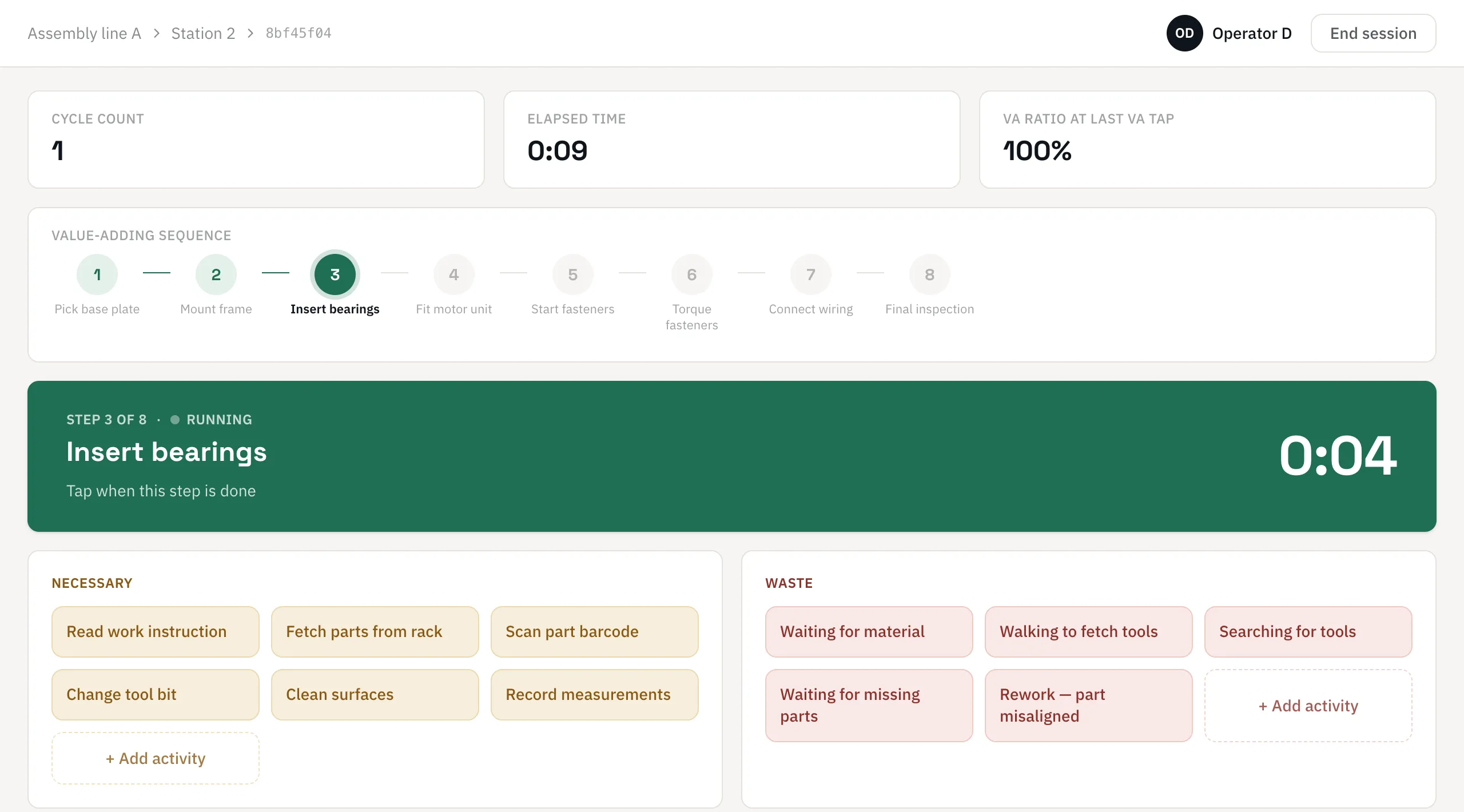
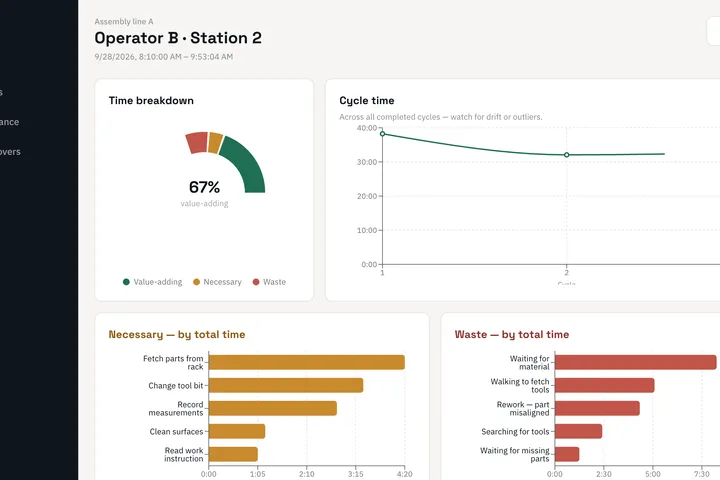
Capture value-adding, necessary and waste time on a tablet while you watch the operator — or tag it afterwards against a video. Available now · Learn more →
Line Balancing (Yamazumi)
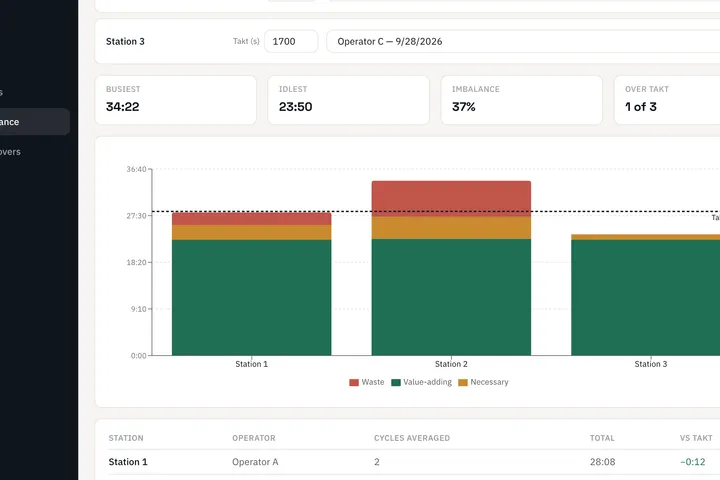
One stacked bar per station, built from your time studies, set against each station’s takt time — so the bottleneck is obvious. Available now · Learn more →
SMED Changeover
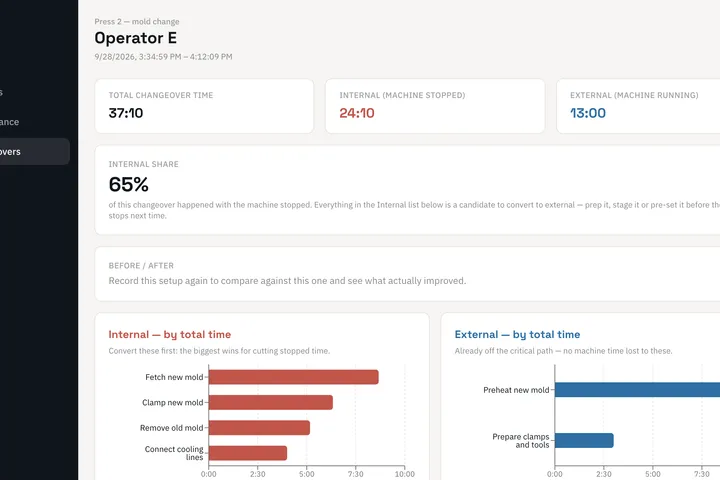
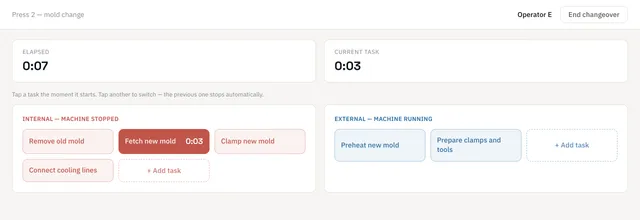
Time every changeover task, split internal (machine stopped) from external (machine running), and see what to convert first. Available now · Learn more →
Ergonomic Assessments (REBA, RULA, NIOSH)
Score postures and lifting tasks with the standard methods, with photo and video evidence attached to each assessment. Coming next · Learn more →
Available now
Three tools, ready for your next kaizen
See it on your own process
In 30 minutes we show you the tools on a line like yours, answer your questions and tell you honestly whether they fit.
LeanPad AIIn development
From observations to improvements, in minutes
You capture the work. LeanPad AI reads the whole study — every cycle, wait and walk — finds the bottleneck, ranks the waste and proposes the fixes worth doing first.
Observations & data
- 3 cycles recorded
- 21 min of waste found
- 14 activities timed
- 1 operator, 1 station
LeanPad AI
Analysis & insights
- Finds the bottleneck
- Ranks the waste
- Spots repeating patterns
- Recommends actions
Improvement opportunities
- 01Stage material before Mount frame≈ −2.8 min / cycle
- 02Keep tools at the station≈ −1.7 min / cycle
- 03Check part alignment upstream≈ −1.4 min / cycle
Example based on a demo time study · LeanPad AI is in development
AI assistant
Ask your report anything
Every report comes with an assistant that answers from your own data: why a cycle ran long, what drove the changeover time, which task carries the most risk — and what to do about it.
- Answers from your study, not from the internet
- Points to the cycle, step or task behind each answer
- Turns the answer into actions for the tracker
Assembly line A · Station 2
Time study — Operator B
VA ratio
67%
Waste
21:20
Cycle times
- Cycle 138:14
- Cycle 232:04
- Cycle 332:46
Waste — by total time
- Waiting for material8:15
- Walking to fetch tools5:05
- Rework – part misaligned4:20
- Searching for tools2:25
AI assistant
Why was cycle 1 so much longer?
Cycle 1 took 38:14, about 6 minutes more than cycles 2 and 3. Most of the gap is a rework on a misaligned part at Fit motor unit (4:20), which only happened in cycle 1, plus a longer wait for material (3:10 instead of 2:20–2:45).
Suggested actions
- Check part alignment at the previous station
- Stage material at the line before Mount frame
- Keep the tools at the station
Illustration with demo data · LeanPad AI is in development
Built for the shop floor
Made for the people doing the studies
Works offline
Studies run on the tablet itself. No Wi-Fi on the line, no problem — nothing is lost if the connection drops.
Your data stays with you
No account and no cloud required. Recordings stay on your device; the optional AI only receives what you choose to analyse.
Tap, don’t type
Large buttons for every step, task and waste, so the observer watches the work — not the screen.
Live or from video
Time it as it happens, or tag a recording afterwards and click any action to replay that moment.
Results in seconds
Pareto charts, cycle timelines and VA ratios the moment the study ends. Export to Excel, PDF or CSV.
Buy only what you use
Licensed per device, one module at a time. Add modules later and keep every recording.
Sectors
Born in heavy industry. Useful wherever work is repeated.
Manufacturing
Heavy machinery & equipment · Automotive OEMs & suppliers · Metal fabrication & machining · Shipbuilding, rail & energy equipment · Aerospace & defence · Electronics & contract manufacturing · Medical devices · Appliances, HVAC, furniture & prefab · Food, beverage & meat processing
Beyond the factory
Warehousing & logistics · Occupational health & physiotherapy · Hospitals, labs & pharmacies · Restaurants & quick service · Airline ground handling & MRO · Hotels & housekeeping · Retail & grocery · Field service & utilities · Universities & training
Made to fit
Your process, your tools
Customise our products
Your vocabulary, templates, reports, languages and brand. Integrations with your ERP, MES or BI. We adapt the product to your plant, not the other way round.
Build something new
A problem none of our products covers? We design and build a custom tool from scratch — from a first prototype on the floor to a supported product.
FAQ
Common questions
What is LeanPad?
LeanPad is lean manufacturing and industrial engineering software. It replaces the stopwatch, clipboard and spreadsheet with tablet tools for time studies, line balancing, SMED changeovers and ergonomic assessments, and gives the analysis the moment the observation ends.
What hardware do I need?
A Windows PC or an Android tablet is enough. If you prefer, we supply ready-to-use kits: a rugged tablet with the licence activated, a rolling stand, and a camera for video studies.
Does it need an internet connection?
Only once, to activate the licence. After that the capture tools work fully offline, and recordings are saved on the device as you go.
Where is our data stored?
On your device. The core tools send nothing to us or to a cloud, and you can export to Excel, PDF or CSV and back up or restore at any time. If you add AI, only the study, clip or photo you choose to analyse is sent, through our servers.
Do the tools use AI?
They will, as an option. AI add-ons are in development for each module — suggested tap points from video, line rebalancing, SMED conversion ideas, posture tracking, written reports and an assistant you can question about any report. The tools work fully without them.
Can we start with one module and add more later?
Yes. Modules are licensed per device, and adding one keeps every recording you already have — for example, adding Line Balancing on top of Time Study.
How do we see it in action?
Book a demo. In about 30 minutes we walk you through the tools on a process like yours and answer your questions.
Book your lean manufacturing software demo
Tell us about your line. We will show you the tool that fits, what we would adapt, or what we would build.
See it on your own process
Book a demo