
SMED software
SMED software to cut changeover time
Time every changeover task, split internal from external, and get the list of what to convert first — live at the machine or from a video.
You cannot shorten a changeover you have not measured
A SMED workshop starts with filming the changeover and listing every task on sticky notes. LeanPad turns that into taps: each task is timed and classified as internal (machine stopped) or external (machine running) while it happens, and the analysis is ready when the first good part comes out.
Features
The SMED method, on a tablet
Internal versus external
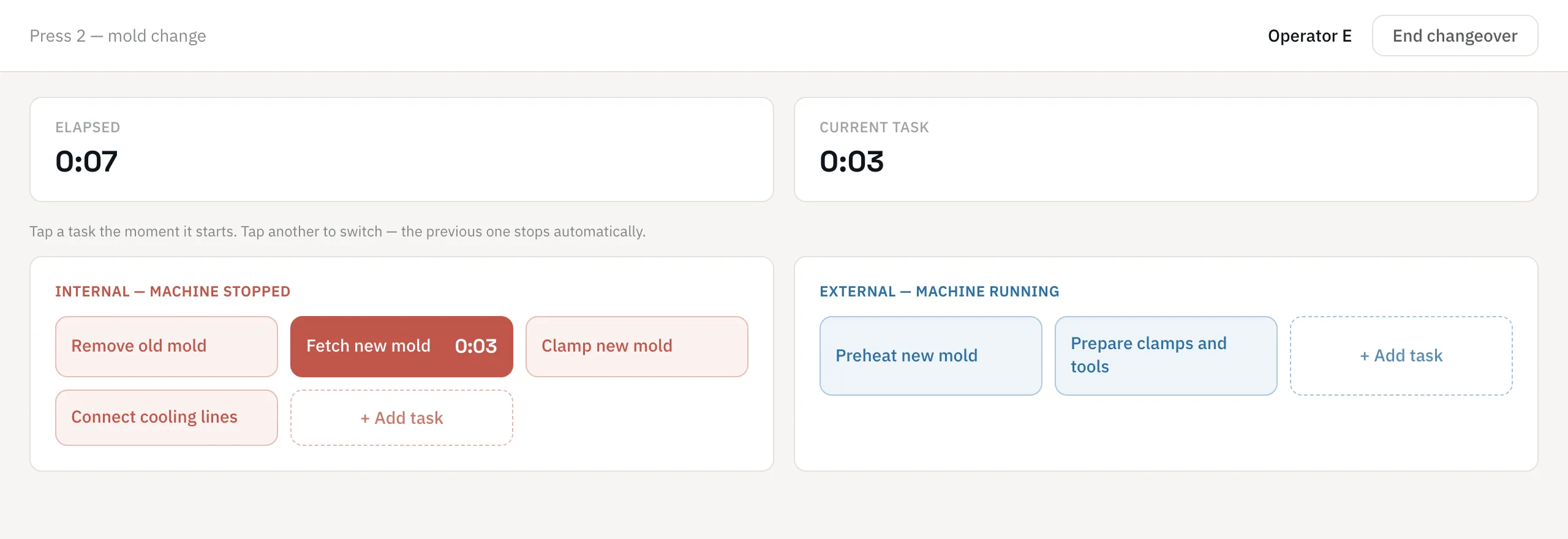
Two boxes on screen: tasks that stop the machine and tasks that do not. Tap the one that starts; the previous one stops.
Live or from video
Record at the machine, or attach a video of the changeover and tag it calmly afterwards. Click a task to replay it.
Add tasks as they appear
Something unplanned? Add a task in the middle of the recording: the clock starts on the tap.
Pareto of internal time
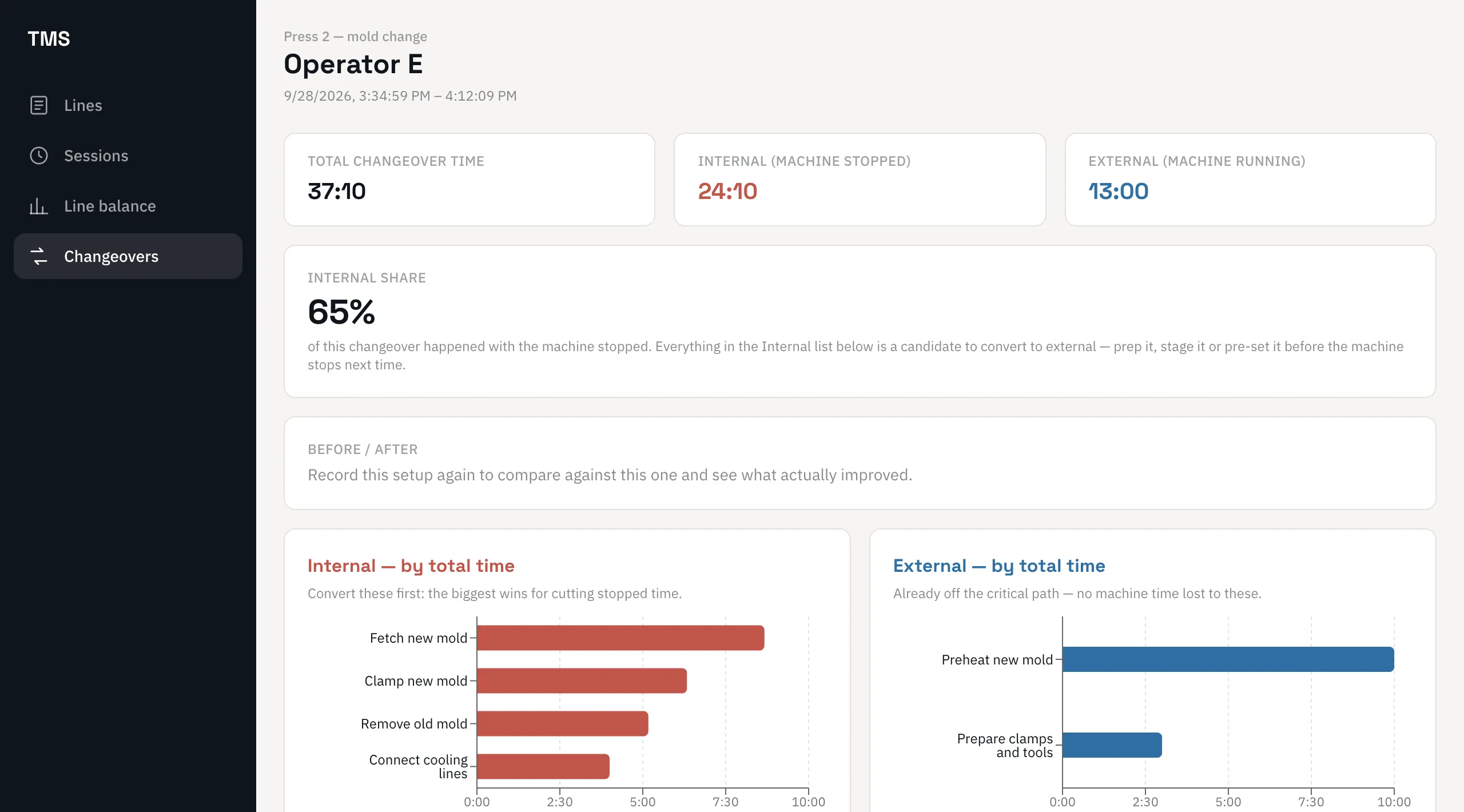
The longest internal tasks come first. That is your conversion to-do list.
Before and after
Record the same setup again after the improvements and compare task by task what was really gained.
Works on its own
SMED is available standalone, or alongside Time Study and Line Balancing on the same device.
Record the changeover as it happens
Internal tasks on the left, external on the right. One tap starts a task and stops the previous one, so the observer keeps their eyes on the machine.
- Elapsed time and current task always visible
- Operator recorded with each changeover
- Tasks pasted from Excel when you set up
See what to convert first
Total changeover time, internal and external time, and the internal share — then Pareto charts of each. Everything in the internal list is a candidate to prepare, pre-set or move outside the stop.
- Internal share of the changeover
- Pareto of internal and of external tasks
- Sequence of the changeover, task by task
A SMED analysis in four steps
List the tasks
Create the setup and classify each task as internal or external.
Record the changeover
Tap each task as it starts, live or on a video.
Convert and streamline
Use the Pareto to move internal tasks outside the stop and shorten the rest.
Measure again
Record the new changeover and compare before and after.
LeanPad AIIn development
Conversion ideas, drafted by AI
The AI add-on (in development) suggests which internal tasks can become external and why, drafts the changeover procedure from a recording, and answers questions about the report.
- Suggested internal-to-external conversions, with the reasoning for each
- A written changeover procedure drafted from a recording, ready to post at the machine
- Chat with the changeover report: ask what drove the internal time or what changed since last time
See it on your own process
In 30 minutes we show you the tools on a line like yours, answer your questions and tell you honestly whether they fit.
Frequently asked questions
What is SMED software?
SMED software supports the Single-Minute Exchange of Die method: it records the tasks of a changeover with their duration, separates internal from external work, and shows where the changeover time can be reduced.
What is the difference between internal and external tasks?
Internal tasks can only be done while the machine is stopped, such as removing the old tool. External tasks can be done while it is still running, such as bringing the next tool to the machine. SMED converts as many internal tasks as possible into external ones.
Can I analyse a changeover from a video?
Yes. Attach the video, play it, and tap each task when it starts on screen. You can pause at any time, and click a task in the results to replay it.
Do I need the Time Study module to use SMED?
No. SMED Changeover is sold standalone or together with the other modules.
How do I prove the gain after a SMED workshop?
Record the same setup again. The before/after comparison shows the total, internal and external times side by side, and the change for every task.
Other LeanPad solutions
The tools share the same devices and data, so each one makes the next more useful.
Time Study
Capture value-adding, necessary and waste time on a tablet while you watch the operator — or tag it afterwards against a video. Learn more →
Line Balancing (Yamazumi)
One stacked bar per station, built from your time studies, set against each station’s takt time — so the bottleneck is obvious. Learn more →
Ergonomic Assessments (REBA, RULA, NIOSH)
Score postures and lifting tasks with the standard methods, with photo and video evidence attached to each assessment. Learn more →
See the SMED software on one of your changeovers
Book a demo: bring a changeover video if you have one and we will analyse it together.
See it on your own process
Book a demo