
Time study software
Time study software for the shop floor
Replace the stopwatch, the clipboard and the spreadsheet. Tap each step as the operator works, and the analysis is ready before you leave the station.
An hour of observation should not cost a day of write-up
A time and motion study done by hand means a stopwatch in one hand, a form in the other, and an evening re-typing numbers into Excel. LeanPad records every tap with its timestamp, so cycle times, the value-added ratio and the Pareto of losses are calculated for you — the same way for every observer, every time.
Features
Everything a time and motion study needs
Tap to time
One large button for the current value-adding step. Tap when it ends and the next one starts — exactly one timer runs at any moment.
Value-adding, necessary, waste
Interruptions are one tap away: fetching parts, reading the instruction, waiting, walking, rework. Each is timed and classified.
Live or from video
Observe at the station, or attach a video and tag it afterwards. Click any action in the results to replay that exact moment.
Cycle after cycle
Record as many cycles as you need. Cycle-time trends show drift and outliers; each cycle gets its own timeline.
Set up from Excel
Paste the assembly sequence, necessary tasks and wastes straight from a spreadsheet. Add a new activity on the spot while timing.
Offline and on your device
No Wi-Fi needed at the line. Every tap is saved as it happens, and nothing leaves the tablet unless you export it.
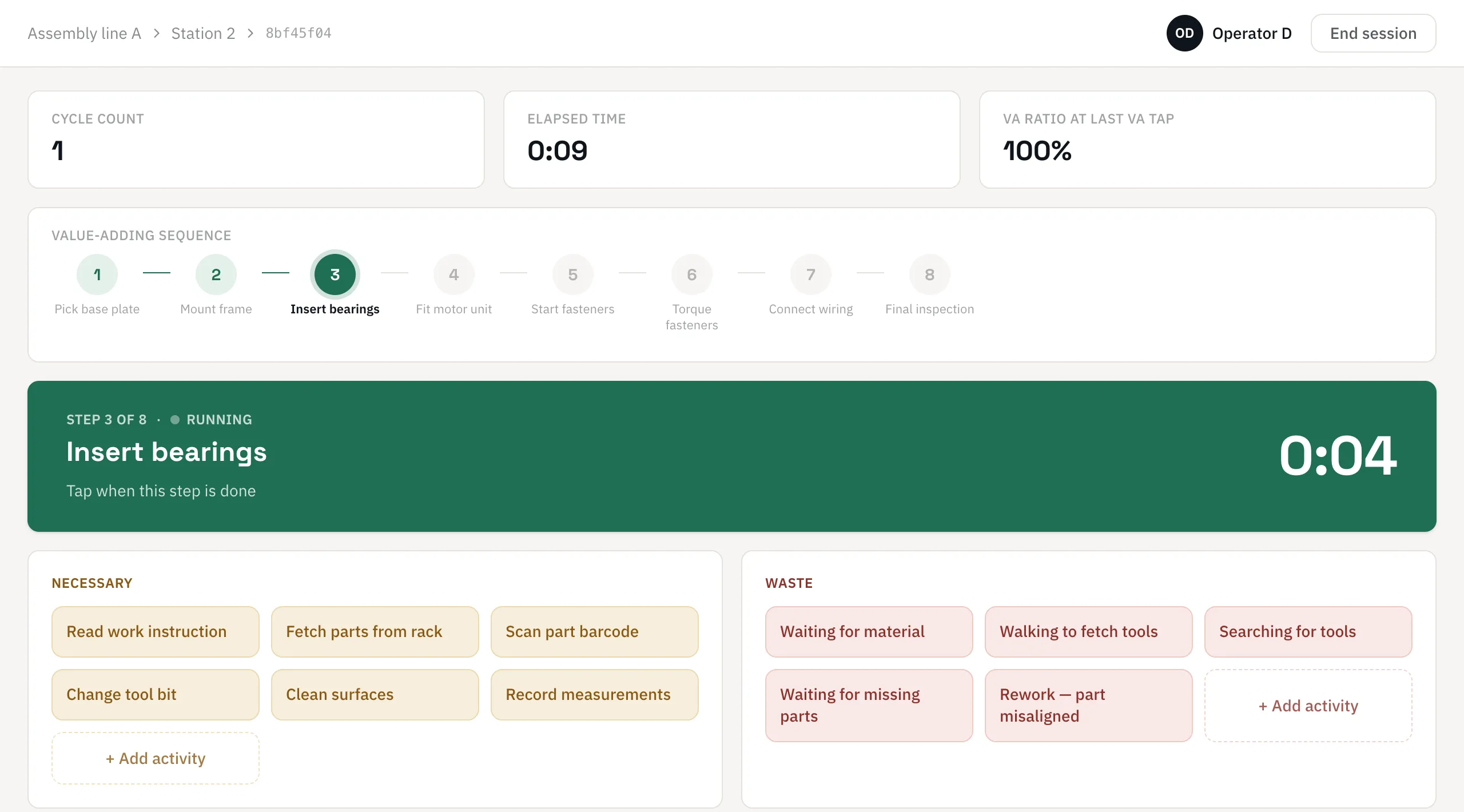
The capture screen: watch the work, not the tablet
The step in progress fills the screen. Necessary tasks and wastes sit below as tiles with their own live timers, so an interruption is recorded in one tap and the step resumes with the next.
- Value-adding sequence with the current step highlighted
- Cycle count, elapsed time and VA ratio always visible
- Add an unexpected activity without stopping the clock
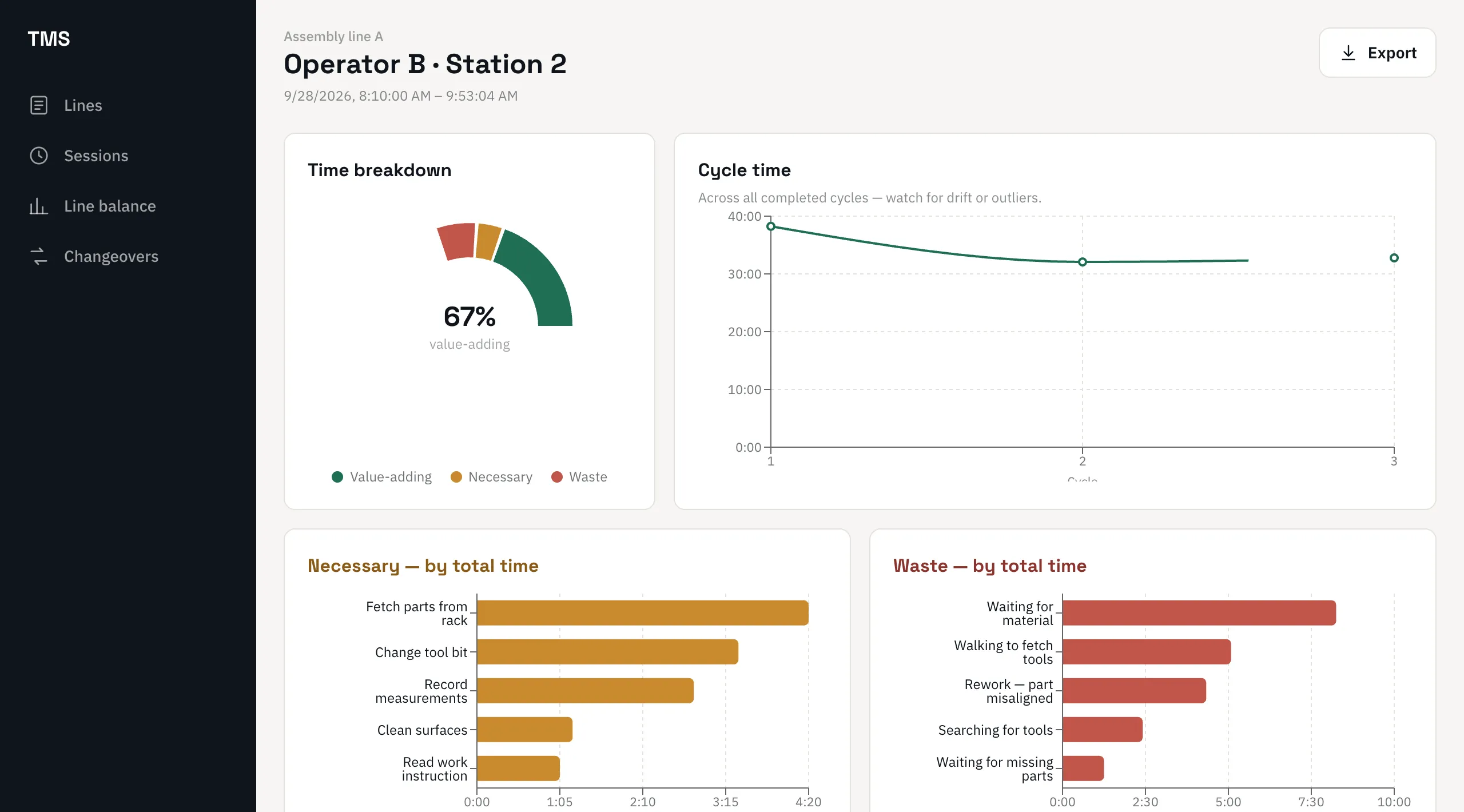
The results: where every minute went
The moment the session ends you get the breakdown of value-adding, necessary and waste time, the cycle-time trend, and Pareto charts that put the biggest losses first.
- Value-added ratio and time breakdown
- Pareto of necessary tasks and of wastes
- Excel, PDF and CSV exports of the analysis and raw data
A time study in four steps
Set up the line
List the steps, the necessary tasks and the wastes you expect. Paste them from Excel.
Observe and tap
Name the operator and the station, then tap as the work happens — or tag a video.
Read the results
Cycle times, VA ratio and Pareto charts are ready the second you end the session.
Export and act
Share the report, feed the line balance, and start with the biggest loss.
LeanPad AIIn development
Time studies, analysed by AI
The AI add-on (in development) proposes tap points from a video for you to confirm, writes a summary of each session, and answers your questions about the results.
- Suggested tap points from an attached video, for you to confirm or adjust
- A written summary of every session: where the time went and what to fix first
- Chat with your results: ask why a cycle ran long or where the waste is, and get answers from your own data
See it on your own process
In 30 minutes we show you the tools on a line like yours, answer your questions and tell you honestly whether they fit.
Frequently asked questions
What is time study software?
Time study software records how long each element of a task takes while an observer watches the work, then calculates cycle times and shows where time is lost. It replaces the stopwatch, paper form and spreadsheet of a manual time and motion study.
Can I run a time study from a video?
Yes. Attach a video to the session and tag each step and interruption while it plays. In the results, clicking an action replays that moment of the video.
Does it work without an internet connection?
Yes. After a one-time licence activation, the software works fully offline on a Windows PC or an Android tablet. Your studies are stored on the device.
Can I export the time study to Excel?
Yes. The analysis and the raw data export to Excel, PDF and CSV, with real date, time and numeric cells so you can keep working on them.
Does it calculate standard times with performance rating and allowances?
Today LeanPad reports observed times per step, per activity and per cycle. Performance rating and allowances are on the roadmap; tell us how you set your standards and we will show you what is possible now.
How does it connect to line balancing?
Every session is recorded at a station of a line. The Line Balancing module stacks those sessions into a Yamazumi chart against takt time, with no re-entry of data.
Other LeanPad solutions
The tools share the same devices and data, so each one makes the next more useful.
Line Balancing (Yamazumi)
One stacked bar per station, built from your time studies, set against each station’s takt time — so the bottleneck is obvious. Learn more →
SMED Changeover
Time every changeover task, split internal (machine stopped) from external (machine running), and see what to convert first. Learn more →
Ergonomic Assessments (REBA, RULA, NIOSH)
Score postures and lifting tasks with the standard methods, with photo and video evidence attached to each assessment. Learn more →
See the time study software on your own process
Book a 30-minute demo: we set up one of your lines and time a cycle together.
See it on your own process
Book a demo